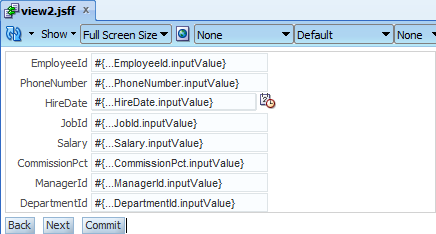
That exercise requires you to prepare sample fusion application that bases on departments table in HR schema. There will be only one page that displays updateable grid of data from the ViewObject with additional Commit and Rollback buttons (always enabled).
For test purposes assumption is that each department has assigned a manager to it (ManagerId is not empty). Please go to the Department entity, select Business Rules tab. Click on the Entity Validators node and green plus icon in the top right corner.
The rule disallows null values in the ManagerId attribute. Sample is ready to run. Remove values from two or more rows in the table and click Commit button.
Entity validators are fired properly. But here you can see all of the attributes, it is really easy to point the row that causes an error. The real life is not so simple. For the user it'll be a lot easier with the human readable message that contain hints how to fix the problem.
Please go back to the error message definition and change them as on the screens below. Note that Expression field executes Groove scripts.
Re-run the test and the user know exactly what went wrong.
Few clicks to achieve very nice effect. While writing this post i've found hundreds of usages :)
Thursday, 28 August 2014
Thursday, 21 August 2014
tricks with view criterias
View Criterias provide useful mechanism to extend where clause in your SQL query. Most of the cases can be provided using wizards. But, as real life shows, wizard is only a wizard. It doesn't allow you to put an inline query inside. What if such query needs to be parametrized by a binded variable? Using wizard i've created the sample view criteria:
Let's go to the source (or view object structure if you like) to give the answer for that kind of the questions.
Please select ViewCriteriaItem node and go to its Property Inspector.
To put an SQL query to the view criteria you need to do two things. First you need to change IsSqlFragment flag to true. Second is to write an SQL query in Value attribute. Please remember about putting it into brackets.
If you need to parametrize the query with bind variable, you need to set two additional flags. When you set IsBindVarValue to true, the BC4J framework will treat the value as a bind variable. I won't paste the screenshot from the wizard after leaving GenerateIsNullClauseForBindVars flag with its default. This flag needs to be set to false to avoid SQL comparison Values attribute value with null.
Of course the bind variable needs to be defined as in default, wizard way. Screenshot from the view object's source:
After changing values using Property Inspector, please be aware that the wizard may change flag values and whole query won't work as you expect.
Wednesday, 13 August 2014
overview of skipValidation attribute
ADF as a technology allows you to achieve a lot of things in many many ways. That refers mostly to the validation process. One of them needs few days of coding, other are simple. But, as usually, you need to know that they exists. Let's assume a common business case - the bigger form has been divided to several smaller parts. There are both single attribute and whole entity validators defined. For instance, you are not able to have a mortgage without a collateral, or an insurance policy without policyholder. Each entity has its own attributes which are at least mandatory. There are also cross entity dependencies. Such cases sounds so simple but on the other hand could take a lot of effort to develope. Please think how to implement such case.
To simplify the real life scenarios, Employees entity from HR schema will be fulfilled in three steps wizard. On the first station user is supposed to fill first name, last name and the e-mail address. On the second one there will be placed the rest of the attributes. On the third one, there will be only a read only summary. Please create a demo fusion application. In the model project please create only Employees entity and an updateable ViewObject based on it using Business Components from Tables option.
Now please create new taskflow, drop three view activities and connect them as on the picture below. Create each page by double click on the activity.
Drag EmployeesView from the Data Control and drop on the first page. Select only FirstName, LastName and Email attributes. Please drag and drop Commit (from the root node of AppModuleDataControl) and CreateInsert (the EmployeesView1 node in the AppModuleDataControl) operations and add buttons to call navigation actions.
Do the same for the second view but pick all attributes excluding three mentioned before.
Note that on each two pages few of the attributes are mandatory. On the last page drag EmployeesView as read-only form.
Commit button should be always enabled (for tests purposes). Create an empty JSP page and drop the taskflow on it. The page is ready for testing so please run the sample. During the test please click CreateInsert button to create new row and Next button to navigate to the second page. Validation error has been thrown.
Behavior is expected, on the form there are required mandatory fields. The form contains mandatory attributes which needs to be fulfilled. Please put test data into them and one more time click Next.
Another error! About the fields that aren't currently displayed. First thing ever done on such error is to set Immediate attribute of command buttons to true. It is worth to try, so please set Immediate="true" for Next button on the first page and try the test again. Put test values into LastName and Email, press Next and fulfill each mandatory field on the second page. After that please click Commit.
One more time an error! And it is about the fields that shouldn't be empty. Should they? In fact they should be empty. The reason is hidden in the Immediate attribute. The deeper look inside the JSF life cycle will give the answer.
After set immediate to true the Update Model Values phase is omitted. Even if you have typed values in the browser, the BC4J layer is not updated with them. The question now is what to do else. One of possible solution is to set autoSubmit to true for each mandatory field. Or remove mandatory at the entity level, the database will check it on its side. Not really good thinking, it'll cause a lot of AJAX calls in the background, what with the application performance? There is at least 3-tier architecture... What if the validation will be much more sophisticated?
Please revert the immediate changes, autoSubmit and mandatory settings if you've tried it. Now please go to the page definition of the first and the second page. In the Structure window select root node, in the Property Inspector change skipValidation attribute to true and run the tests again.
It is impossible to click Next on the first page while there is at least one mandatory attribute. But after filling them you can go to the second page to work there. You can easily go back to the first one or try to Commit changes.
SkipValidation attribute bypasses the model entity validations to the transaction's commit. Mandatory checks are fired, that's why such attributes cannot be empty. One-click easy mechanism, and no coding at all. How many days have you saved or could you saved knowing that attribute?
SkipValidation property can accept values like skipDataControls or validateCurrentRows. Please read more about it, maybe you'll find something more interesting than my post. The third page is for your own purposes, you can try to mix with the various values of these attributes :)
To simplify the real life scenarios, Employees entity from HR schema will be fulfilled in three steps wizard. On the first station user is supposed to fill first name, last name and the e-mail address. On the second one there will be placed the rest of the attributes. On the third one, there will be only a read only summary. Please create a demo fusion application. In the model project please create only Employees entity and an updateable ViewObject based on it using Business Components from Tables option.
Now please create new taskflow, drop three view activities and connect them as on the picture below. Create each page by double click on the activity.
Drag EmployeesView from the Data Control and drop on the first page. Select only FirstName, LastName and Email attributes. Please drag and drop Commit (from the root node of AppModuleDataControl) and CreateInsert (the EmployeesView1 node in the AppModuleDataControl) operations and add buttons to call navigation actions.
Do the same for the second view but pick all attributes excluding three mentioned before.
Note that on each two pages few of the attributes are mandatory. On the last page drag EmployeesView as read-only form.
Commit button should be always enabled (for tests purposes). Create an empty JSP page and drop the taskflow on it. The page is ready for testing so please run the sample. During the test please click CreateInsert button to create new row and Next button to navigate to the second page. Validation error has been thrown.
Behavior is expected, on the form there are required mandatory fields. The form contains mandatory attributes which needs to be fulfilled. Please put test data into them and one more time click Next.
Another error! About the fields that aren't currently displayed. First thing ever done on such error is to set Immediate attribute of command buttons to true. It is worth to try, so please set Immediate="true" for Next button on the first page and try the test again. Put test values into LastName and Email, press Next and fulfill each mandatory field on the second page. After that please click Commit.
One more time an error! And it is about the fields that shouldn't be empty. Should they? In fact they should be empty. The reason is hidden in the Immediate attribute. The deeper look inside the JSF life cycle will give the answer.
(image source: http://docs.oracle.com/cd/E15051_01/web.1111/b31974/adf_lifecycle.htm)
After set immediate to true the Update Model Values phase is omitted. Even if you have typed values in the browser, the BC4J layer is not updated with them. The question now is what to do else. One of possible solution is to set autoSubmit to true for each mandatory field. Or remove mandatory at the entity level, the database will check it on its side. Not really good thinking, it'll cause a lot of AJAX calls in the background, what with the application performance? There is at least 3-tier architecture... What if the validation will be much more sophisticated?
Please revert the immediate changes, autoSubmit and mandatory settings if you've tried it. Now please go to the page definition of the first and the second page. In the Structure window select root node, in the Property Inspector change skipValidation attribute to true and run the tests again.
It is impossible to click Next on the first page while there is at least one mandatory attribute. But after filling them you can go to the second page to work there. You can easily go back to the first one or try to Commit changes.
SkipValidation attribute bypasses the model entity validations to the transaction's commit. Mandatory checks are fired, that's why such attributes cannot be empty. One-click easy mechanism, and no coding at all. How many days have you saved or could you saved knowing that attribute?
SkipValidation property can accept values like skipDataControls or validateCurrentRows. Please read more about it, maybe you'll find something more interesting than my post. The third page is for your own purposes, you can try to mix with the various values of these attributes :)
Subscribe to:
Posts (Atom)